

Archiving All Instagram Posts: What Are the Tips & Tricks
In the rapidly developed world of social media, our online presence becomes a collection of memories, moments, and important events on popular social media platforms such as Instagram.
Instagram, a platform known for sharing pictures and stories, lets us share and show parts of our lives to users worldwide.
However, sometimes, we want to tidy up our profiles without removing our posts forever and eliminating them from our profile preeminently.
Whether for personal reasons, privacy, or just wanting to update your online presence, archiving posts on Instagram is a great solution for removing your content temporarily from your profile.
So, this guide is here to help you understand archiving all Instagram posts and the tips and tricks.
So, are you ready to start this journey of efficiently organizing your Instagram posts?
How does archiving posts on Instagram work?
If you are tired of your posts and want to remove some of them temporarily to tidy up your profile and create a better appearance on your Instagram profile, archiving your Instagram posts is the best option for you.
You can archive the posts on Instagram you want to be hidden from your audience, unarchive them, and bring them back anytime you desire.
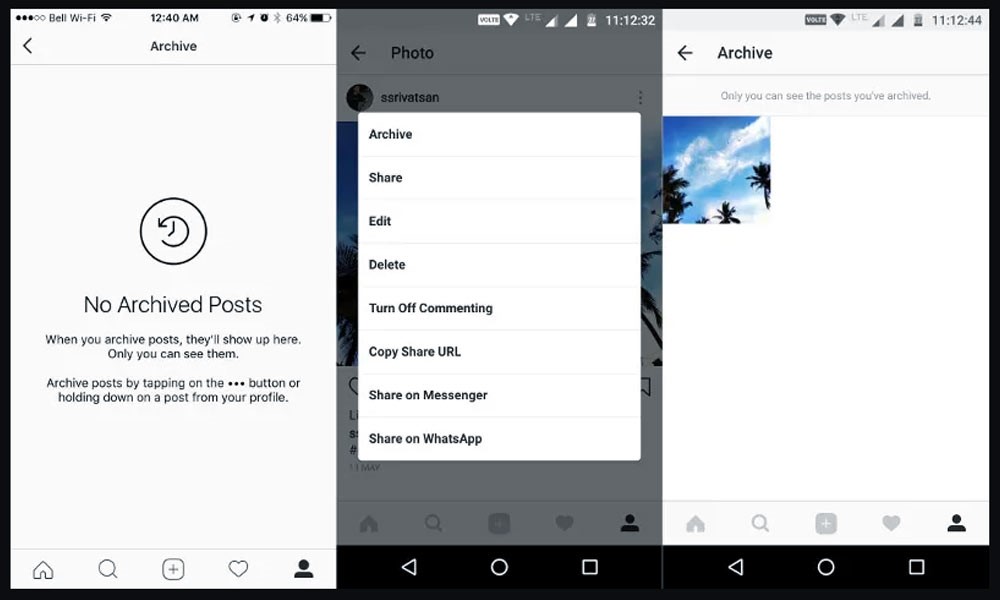
If you want to archive individual posts on Instagram, follow these quick, simple steps to go:
. Open the Post
First, go to the post you want to archive on your profile.
. Access Options
Tap on the dot’s icon in the top right corner of the post.
. Select Archive
Choose the “Archive” option from the menu that appears.
You have successfully archived your post and can unarchive it from your profile anytime.
However, sometimes you can archive many or all Instagram posts, so archiving them individually takes time and effort.
You can consider taking these steps if you want to achieve a large number of posts on Instagram:
- First, open our Instagram and tap your profile picture on the top right side of the page to go to your profile.
- Then, tap the three horizontal lines in the top right corner.
- Afterward, tap “Photos and Videos” and “Posts.”
- At the top right, tap “Select.”
- Select the circle icon on each post you want to archive or tap “Select All” for quicker mass archiving.
- Finally, tap “Archive” at the bottom of the screen (on iOS) or the top (on Android) and confirm.
You have successfully archived your Instagram-selected posts and can unarchive them anytime you want from your profile.
Why should I archive my Instagram posts?
There are many reasons why archiving your Instagram posts can be helpful.
It can help protect your privacy, help you show off the best parts of your profile and content, keep your mental health in check, maintain a professional image on Instagram users’ home feeds, and have control over the content and the viewers of the shared content.
Plus, you can always unarchive posts if you change your mind!
Here are the different benefits of archiving your posts:
1. Having a professional illustration
Archiving your Instagram posts can also be beneficial for maintaining a tidy and attractive profile on Instagram, boosting your reach.
By removing posts that no longer fit your desired theme or style, you can create a more appealing feed that will attract more followers and engagement.
2. Easier navigation
Additionally, archiving old posts can help you categorize your profile and make it easier for followers to navigate and find the most relevant content.
This can increase engagement and a more positive user experience for your audience.
3. Brand recognitions
Archiving posts can also be useful for businesses and influencers who want to manage their content and strategically highlight their best work.
By categorizing your feed and showcasing only your top-performing posts, you can effectively illustrate your brand and attract more followers and potential customers, increasing brand recognition.
Archiving your Instagram posts can be a valuable tool for having more control over your online presence, protecting your privacy, and enhancing your overall social media strategy.
It allows you to carefully manage your feed, showcase your best content, and present a professional image to your audience.

How can I unarchive my posts on Instagram?
Sometimes, you should return the posts you have archived on Instagram for any reason.
You can re-watch a special memory, share it with a friend, or bring back the content to your Instagram profile again.
Unarchiving posts on Instagram allow you to easily access your archived posts and return them to your Instagram profile later, making them visible to your audience again.
Whether it’s a beautiful photo, a funny meme, or a helpful recipe, having the option to bring back archived posts on Instagram can enhance your overall experience on the platform.
You can unarchive your Instagram posts by taking these few simple steps:
- First, open the Instagram app and log in to your account.
- Then, go to your profile by tapping on your profile icon.
- After that, tap on three horizontal lines in the top right corner of your profile.
- Scroll down to select Archive from the list.
- Then, at the top of the screen, switch from the “Stories Archive” to the “Posts Archive” if necessary to see your archived posts.
- Then, tap on the post you want to unarchive.
- In the end, tap on the dots icon at the top right of the post and Choose “Show on Profile” or “Unarchive,” depending on your app version.
The post will reappear on your profile in its previous appearance, with all the likes and comments.
Conclusion
To wrap up, archiving Instagram posts is a great way to personalize and tidy up your profile and make it easier for your audience to navigate your Instagram page and view your charming content.
By archiving your old or irrelevant posts on Instagram, you can have a more organized and appealing profile, boosting your engagement and reach and helping you have a powerful presence on Instagram.
In this essay, we showed you how to archive all Instagram posts, and we told you the benefits and steps of unarchiving Instagram posts if you want to bring back your content to your profile.
Have you ever tidied up your Instagram page by archiving your posts? How was it helpful to you?
Inform other Instagram lovers by writing down your experiences with this topic in the comment section!










Leave a Reply